Cells and transistors
Look closely at your layout, see which standard cells your chip is made of, and open any cell to see its transistors.
When Build the chip passes, your design has become a few hundred standard cells placed in rows and wired together. The Cells tab of a project shows what those cells are, and what is inside each one.
- Your RTL
- Synthesizelogic
- Buildstandard cells in rows
- Cells tabthe transistors inside
Close-up of the layout#
Two pictures are drawn from the layout the build produced, at the place where your logic is densest.
| Picture | Shows |
|---|---|
| Rows | A few rows of standard cells, 46 by 23 micrometres |
| Cells | A handful of cells, 15 by 9 micrometres |
Every layer of the cells is drawn. The key under the pictures says which colour is which: diffusion, poly (the transistor gates), local wiring, metal 1 and 2, contacts and vias. Click a picture to open it full size.
The pictures are drawn the first time you open the tab after a build, which takes up to a minute. If you share the project, the second picture also appears on its public page.
Cells in this chip#
The list shows every kind of standard cell the build used and how many times, most used first. It is counted from the layout file, so it is exactly what was built.
Filler cells, well taps and decoupling capacitors are listed separately under the list. They hold no logic. The build adds them to complete the rows and the power network.
Inside a cell#
Choose a cell to see its transistors.
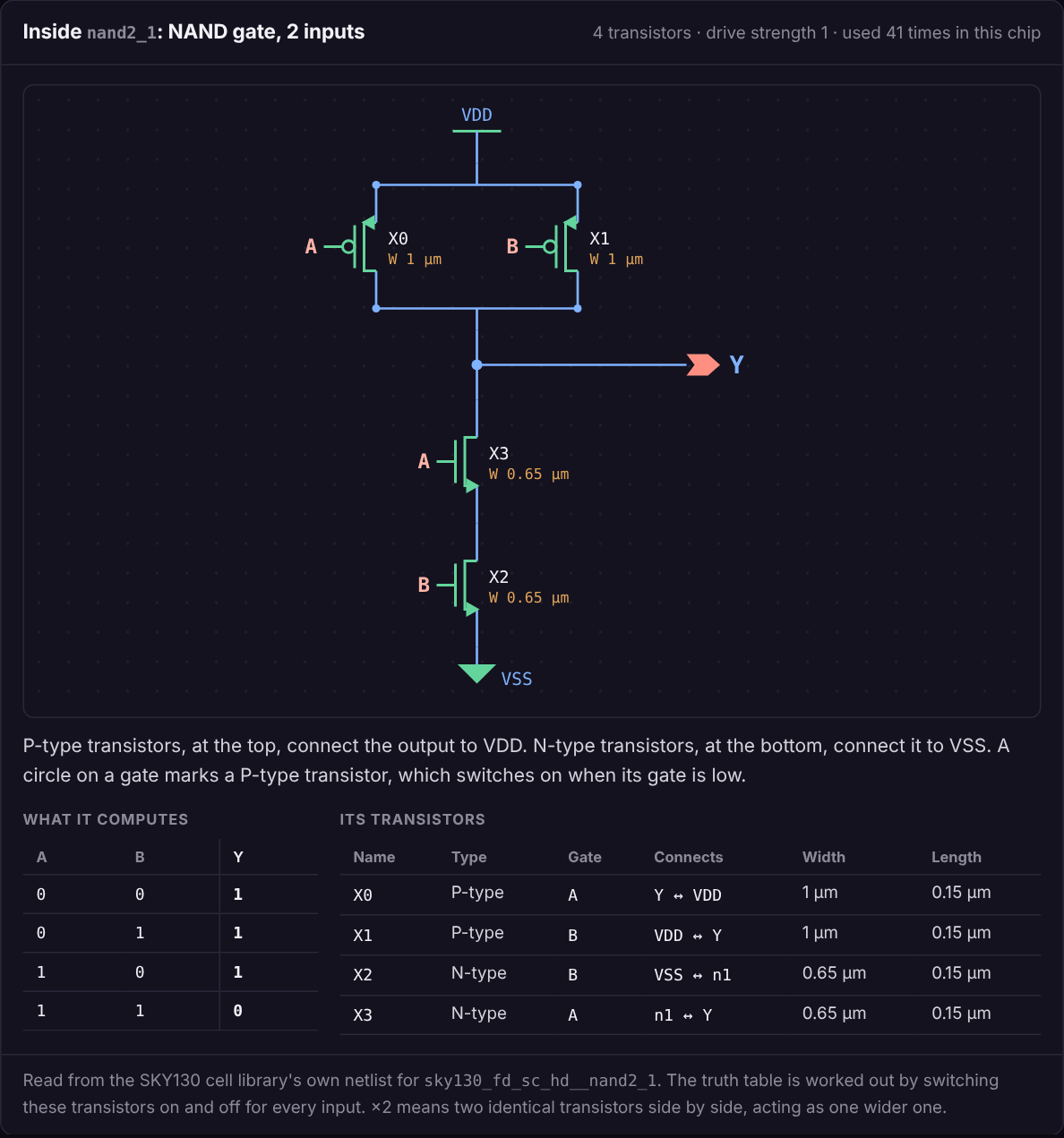
- P-type transistors are drawn at the top, between VDD and the output. A circle on the gate marks a P-type transistor: it switches on when its gate is low.
- N-type transistors are drawn at the bottom, between the output and VSS. They switch on when their gate is high.
- Transistors side by side are in parallel: either one can connect the output. Transistors one above the other are in series: all of them must be on.
- A cell with more than one stage is drawn left to right. A name such as
n1is a wire inside the cell that joins one stage to the next.
Under the drawing are two tables.
| Table | What it is |
|---|---|
| What it computes | The output for every combination of inputs. It is worked out from the transistors themselves, by switching each one on or off |
| Its transistors | Each transistor's type, the wire on its gate, the two wires it connects, and its width and length |
×2 after a name means two identical transistors side by side in the layout, acting as one wider transistor.
Cells that are not drawn#
Flip-flops and latches pass signals through transistors in both directions, so they do not reduce to a pull-up and a pull-down network. For those cells the page lists the transistors and their connections and does not draw a circuit. It also shows no truth table, because the output of a flip-flop depends on what it stored, not only on its present inputs.
A truth table is also left out for a cell with more than four inputs.
Limits#
- The Cells tab needs a build that passed. It shows the latest one.
- It shows one cell at a time. A drawing of every transistor in a chip would be thousands of transistors on one page.
- It reads SKY130 standard cells only.
Verified. Run on 6 October 2026 on a copy of the lab, with a real SKY130 layout built by the lab and the cell netlists of the public SKY130 library. Drawing inside the lab's own container was not run there.
Something unclear or missing? Send feedbackSign in and use Feedback to tell us.