Progress marks and comparing runs
See how far every project has got, lay two simulations over each other, and set targets the lab checks for you.
Three things on this page help you answer "where am I?" without opening logs: the marks on the Projects page, the Compare tab of a project, and the Targets section of a specification.
Progress marks#
On Projects, every row carries five marks.
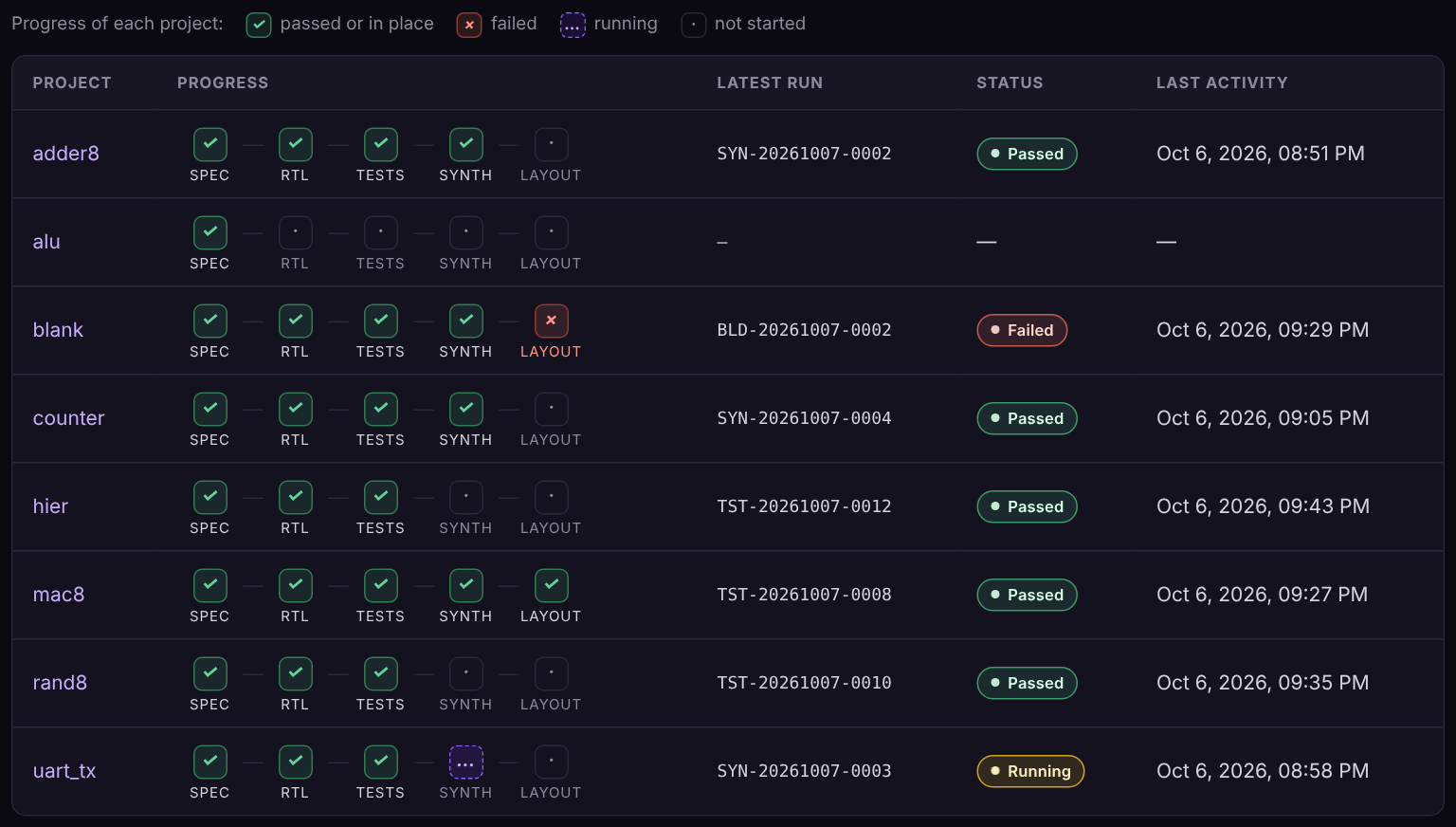
| Mark | Shows a tick when |
|---|---|
| Spec | docs/DESIGN.md is in the project and is not empty. In a guided project, START_HERE.md counts |
| RTL | rtl/top.sv is in the project and is not empty |
| Tests | The latest simulation passed |
| Synth | The latest synthesis passed |
| Layout | The latest chip build passed |
A cross means the latest run of that stage failed. A dashed mark means it is queued or running. A dot means it has not been run. Hover over a mark to read which run it reports, and click a run's mark to open that run.
Compare two runs#
Open a project and choose Compare. The page needs two finished simulations of the project. It opens on the latest run and the nearest earlier run that ended differently, which is usually the failure before a fix. Choose any other pair with the two lists at the top.
- Run the testit fails
- Change the design
- Run the test again
- Open Compare
The signals#
Both recorded waveforms are drawn on one time axis.
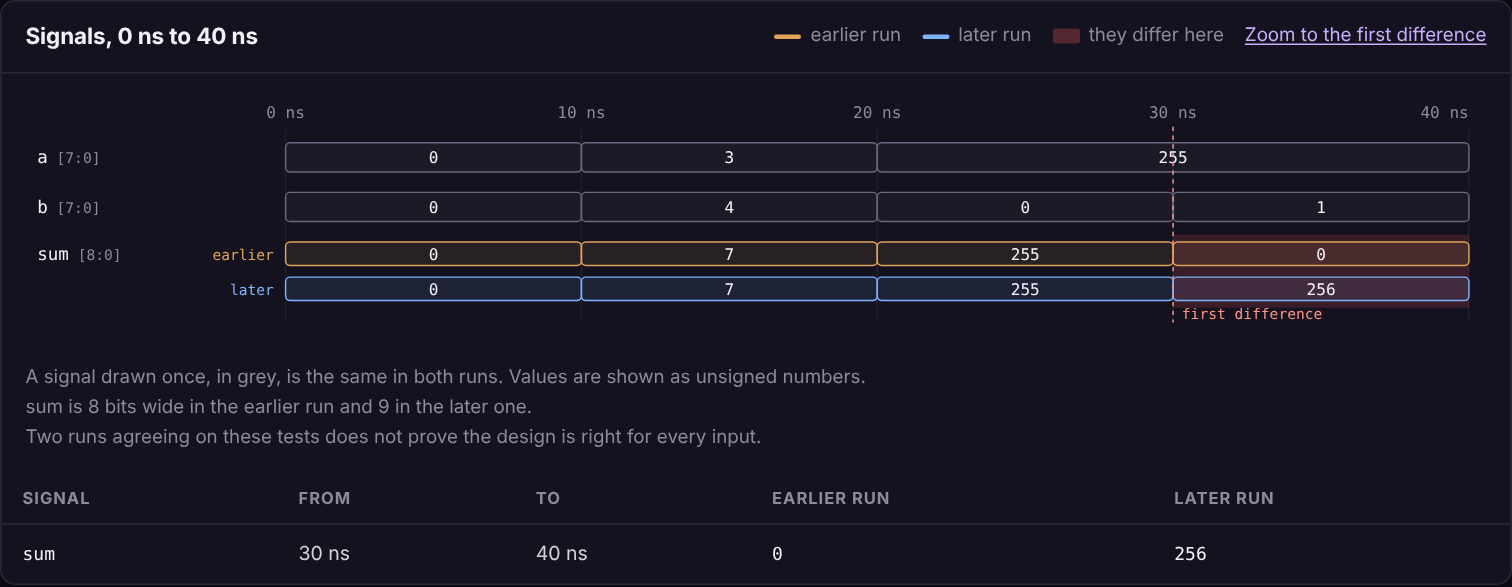
- A signal drawn once, in grey, is the same in both runs.
- A signal that differs is drawn twice, the earlier run above the later one, with a red band wherever they disagree.
- A dashed line marks the first difference. Zoom to the first difference narrows the picture to that moment.
- The table under the picture lists each difference: the signal, the time span, and the value in each run.
Inputs are listed first, then outputs, then any internal signal that differs.
What changed#
The lab keeps a copy of rtl/top.sv and tb/test_top.py at the moment each simulation starts. This card shows the difference between the two copies, so what you see is what each run compiled, not what is in your editor now.
Checks#
| Check | Measured from |
|---|---|
| Every test passes | The simulator's own count in the log of each of the two runs |
| Cells | The size report at the end of the latest synthesis |
| Meets its clock | The timing in the signoff report of the latest chip build |
| Layout checks clean | Design rules, layout vs schematic and antenna in that same report |
Each row is marked Met, Not met, Pending or Measured. Pending means the stage has not produced that value yet. Measured means there is a value but no limit to hold it against. If the synthesis or the build is older than the later simulation, the row says so: it measured an earlier version of the design.
Targets#
To give the lab limits to check, add a Targets section to docs/DESIGN.md:
## Targets

- Cells: at most 700
- Flip-flops: 20
- Clock period: 15 ns| Line | Meaning | Checked against |
|---|---|---|
Cells: at most N | The design must synthesize to N cells or fewer | The latest synthesis |
Flip-flops: N | Exactly N storage cells. Write at most N for a limit | The latest synthesis |
Clock period: N ns | The build must meet timing at this period | The latest chip build, if it was built at that period |
The cell count is of generic cells, the same number the Synthesize stage reports. A line the lab cannot measure, such as a power budget, is listed under the checks as stated but not measured. It is never marked as met.
Limits#
- Compare works on simulations. It does not compare two syntheses or two builds.
- The picture shows up to 22 signals. The table lists the first twelve differences in time order, whether or not the signal is drawn, and says how many more there are.
- Real-number and text signals are not compared.
- Two runs agreeing does not prove the design is right. It shows only that these tests saw the same thing.
Verified. Run on 6 October 2026 against real simulations and syntheses made with Icarus Verilog 12.0, cocotb 2.1.0 and Yosys 0.33, on a copy of the lab. The two chip-build checks were tested with made-up build reports.
Something unclear or missing? Send feedbackSign in and use Feedback to tell us.